Skip to content

Event Door Unlocks

All exterior doors in the Health Sciences are secured by card reader. HS Building Management can unlock exterior doors for events which have been approved through the Use of University Facilities (UUF) process. Questions about event scheduling in Health Sciences spaces can be directed to Health Sciences Classroom Services.

  • Events scheduled by HS Classroom Services do not have to contact HS Building Management to confirm your door unlock. We are made aware of UUF approved events scheduled by HS Classroom Services and automatically set up unlocks for those events.
  • Events not scheduled through HS Classroom Services that have UUF approval and held in Magnuson Health Sciences Center, please contact HS Building Management to set up event door unlocks.

Door unlocks are scheduled once a week on Wednesday afternoons. HS Building Management sends a confirmation email to event coordinators after unlocks are scheduled. Event door unlocks are limited to two exterior doors unlocked for two hours during a scheduled event time. We default to scheduling unlocks to begin one hour before the event start time and end one hour after the event start time.

A map of exterior doors that may be unlocked for events is available below.
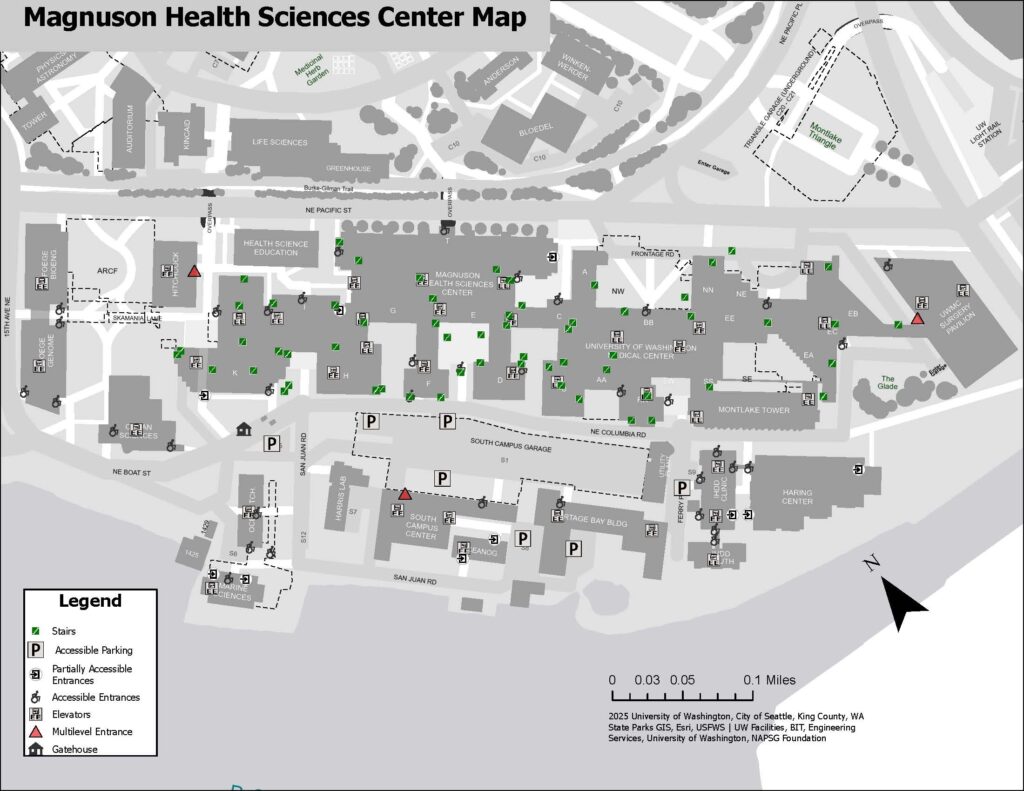
Event Door Unlocks Map [PDF]

Building Shutdown and Work Notifications

HS Building Management provides notifications to building occupants in Health Sciences facilities (MHSC, HSEB, SCC, ARCF, and Foege). These include utility shutdowns, construction updates, and exterior activities in the immediate vicinity.

If you are not currently receiving building notifications, contact HS Building Management at hsbuild@uw.edu. Include your wing location(s)/department in the email so we can sign you up for the correct listservs.

If you have questions or concerns about the effects/timing of a scheduled shutdown: contact UW Facilities Health Sciences Maintenance Zone at kenmcm@uw.edu or 206-543-4962. Be sure to reference the seven-digit work request number in your message.

Health Sciences Shutdowns Calendar

Building Access Coordinator (BAC)

A Building Access Coordinator (BAC) is a designated person in a department or unit who is authorized to request new building access, access badges, and keys. BACs play an essential role in keeping our facilities secure.

Departments may designate anyone within their unit to be a BAC. BACs are responsible for managing access for their department and are expected to be aware of departmental operations.

To register or update BACs for your department, please fill out a new Building Access Coordinator Authorization form and send it to HS Building Management.

BAC Authorization Form [PDF]

Access Badges and Building Access

HS Building Management controls all access badges and card access for the Health Sciences facilities. BACs are responsible for requesting Husky Card access, access badges, and photo IDs on behalf of their units.

BACs may request access for their department only. If access is needed to a space that does not belong to your department, please contact the department that owns the space for authorization.

BACs can submit requests for extra access through our website. For more information about access badges and photo IDs, visit our Access Badges & Photo IDs.

Keys

HS Building Management controls all keying for Health Sciences facilities. Building keys are distributed to individual units through BACs. BACs are responsible for ordering new keys, tracking existing keys, and requesting rekeys on behalf of their units.

For more information about building keys.

Key Procedures

Key Procedures

BACs may order new keys for their department only. If a department needs a key that does not belong to its departmental key series, the department that owns the key series must give their approval for the order.

BACs (or someone designated by a BAC) must pick up ordered keys from T283. Keys are not delivered to rooms or sent by mail.

Each department must have a process for issuing keys as personnel change. BACs should facilitate this process and keep a log of all keys that are in circulation within their department. BACs must track how many keys a department has, which keys are issued out, and which keys open which rooms.

BACs are responsible for maintaining their department’s stock of keys. Any keys which are not issued to personnel should be kept in a secure location. Keys that are not needed can be returned to HS Building Management for recycling.

BACs may be asked to send their key tracking records to HS Building Management for verification. HS Building Management has keying records and a list of all issued keys for Health Sciences spaces. BACs may request a copy of these records from HS Building Management.

BACs must confirm or approve all rekey requests on behalf of their department. HS Building Management will contact the BAC of a space after the rekey order is received.

BACs should update their keying records once a room is rekeyed. They should also request and track any new keys which are needed following a rekey.

For more information about rekeying a space, please review the Keys page.

Access Badges and Photo IDs

HS Building Management manages badge access for Magnuson Health Sciences Center, Foege Building, Health Sciences Education Building, and South Campus Center.

The Health Sciences facilities are secure facilities. Building users must have a Husky Card or UW-issued access badge to enter. Badges should be displayed during business hours. Outside of business hours, badges must be displayed. Some departments may require their personnel to display their badges at all times. There are three types of badges that are used in the Health Sciences zone.

Badge Types

Almost all staff, faculty, and students are eligible for a UW Husky Card. Husky Cards serve as your building access badge and identify you as a UW community member.

Husky Cards automatically come with access to Magnuson Health Sciences Center, Foege Building, Health Sciences Education Building, and South Campus Center perimeter doors. You do not need to request this access if you have a Husky Card.

To obtain a new or replacement Husky Card, please visit the Husky Card Services information page. Once you get your Husky Card, it will take a day for building access to begin working. HS Building Management does not print Husky Cards. We can only change access on active Husky Cards.

Access is automatically discontinued when personnel leave the UW. HS Building Management updates card access by request when personnel transfer departments.

Only designated building access coordinators (BACs) may request additional access on a Husky Card. Please review the Building Access Coordinator (BAC) page for more information.

Request access on a Husky Card UW NetID

Contractors, guests, and vendors are not eligible for Husky Cards. Departments may request a Health Sciences access badge on their behalf. This badge grants building access and serves as photo identification.

HS Building Management prints Health Sciences access badges. Access badges are active for one year from the date of issue. After expiring, access badges may be renewed annually.

  • Access badges cost $25 per print
  • Access badge renewals cost $10

Only designated building access coordinators (BACs) may request access badges. Please review the Building Access Coordinator (BAC) page for more information. Printed access badges are available for pickup in T283.

Request New Badge or Badge Renewal UW NetID

Health Sciences photo IDs are supplemental to Husky Cards. They serve as photo identification only and do not grant building access. Departments may require that personnel carry Health Sciences photo IDs.

Photo IDs cost $10 per print.

Only designated building access coordinators (BACs) may request photo IDs. Please review the Building Access Coordinator (BAC) page for more information. Printed photo IDs are available for pickup in T283.

Request HS Photo ID UW NetID

HS Building Management does not process access requests for animal research spaces. To request access to an animal research space, please contact:

HS Building Management can assist with access issues. Please contact us if you have any questions. Some common issues:

  • If your card doesn’t work on the first tap, wait 5-10 seconds and try tapping it again.
  • Make sure to take your card out of any wallet or case it is stored in while scanning.
  • Even small cracks or bends in the card may cause it to stop working. If your card is damaged, you must get a replacement Husky Card or access badge.
  • Cards may stop working with age or use.

Access Badge and Photo ID Request Page

–NOT AUTHORIZED–
Access to this page is limited to Building Access Coordinators. Please email hsbuild@uw.edu for issues with access to this page.

Keys

HS Building Management manages keys for Magnuson Health Sciences Center, the Health Sciences Education Building, South Campus Center, Foege Building, and ARCF.

The Health Sciences key system is designed along departmental lines. This design ensures that a department can only request keys for spaces that they manage. Departments are responsible for tracking key assignments and keeping accurate keying records. HS Building Management maintains their own keying records and can provide them to departments upon request.

Please select from the following options for information about new key requests, key checkouts, rekeying a room, master keys, and lost keys.

Key Procedures

Key Procedures

HS Building Management processes all new key orders for Health Sciences departments. Do not send requests for Health Sciences keys to the UW Lock Shop.

To order new keys:

  • Email hsbuild@uw.edu to request new key copies. Include the key number, the room number that the key is for, and UW worktags in the email. Note: Cost Center (CC) and Resource (RS) tags are typically required to complete key orders.
  • Only designated Building Access Coordinators (BACs) may order keys. If you are not a BAC, we will require BAC approval before completing the order. Please review the Building Access Coordinator (BAC) page for more information.
  • Information about key cost can be found on the UW Facilities Building Access webpage.

HS Building Management will verify key request information and assign sub-numbers to new keys. HS Building Management then submits information to the UW Lock Shop for key cutting. Orders are submitted once a week on Friday afternoons.

The Lock Shop delivers completed orders to HS Building Management for distribution. HS Building Management will notify requestors when their key order is ready for pick up in T283.

HS Building Management reserves the right to deny new key orders if a request is unapproved, missing information, or your department has failed to comply with our keying policies.

HS Building Management can provide keys for temporary checkout to UW affiliates or contractors.
HS Building Management only keeps master keys in stock. Keys may be borrowed from HS Building Management with the proper intent and identification. Checked out keys must be returned on the specified due date. If a checked out key is lost or misplaced, notify HS Building Management immediately.

Requestors may be held responsible for damages associated with lost keys, including replacing lost key copies and rekeying rooms. Requestors who fail to comply with HS Building Management key checkout policies may be prohibited from checking out additional keys.

HS Building Management works with the UW Lock Shop to rekey rooms in Health Sciences facilities.
A room should be rekeyed if:

  • It has been re-assigned to a new user. All space re-assignments should be rekeyed to the new tenant’s key series.
  • Existing keys to the room have been lost.

To begin a rekey:

  • Submit a work order with UW Facilities to begin the rekey process. You may also email Customer Care at careteam@uw.edu. Please include which room(s) you’d like rekeyed in the order.
  • Only designated Building Access Coordinators (BACs) may confirm and approve rekey requests. Please review the Building Access Coordinator (BAC) page for more information. If you have submitted a rekey order and are not a BAC, we will require BAC approval before proceeding with the order.

HS Building Management will coordinate with the requestor for keying information. HS Building Management will verify keying requirements and advise on best practices if needed. HS Building Management then sends verified information back to the Lock Shop for installation and order completion. New keys requested with rekey requests will be delivered to T283 for pickup.

HS Building Management limits master key assignments in Health Sciences facilities due to security risk.
Health Sciences departments may be issued a limited amount of master keys for their use. Master keys should be assigned to a specific individual or kept in a secure place within a department.

To request new master keys, departments must provide reasoning for the request and identify who will be responsible for the key. Departments are responsible for tracking their master keys and notifying HS Building Management if a master key is reassigned.

HS Building Management conducts an annual audit of Health Sciences master keys. Departments must provide information to HS Building Management about their master keys upon request. HS Building Management may deny new key requests or key checkouts if a department fails to provide requested key assignment information.

Lost keys must be immediately reported to HS Building Management and the affected department.
It is strongly recommended that all spaces opened by the lost key are rekeyed. HS Building Management can provide guidance for specific cases.

If a master key is lost, HS Building Management requires that spaces are rekeyed. If a department chooses not to rekey following the loss of a master key, department leadership must acknowledge the risk associated with declining a rekey.

All-Gender Restrooms

All-gender restrooms are available in the following locations within Magnuson Health Sciences Center (MHSC) and the Foege Building.

All restrooms in the Health Sciences Education Building (HSEB) are all-gender.

  • MHSC A312
  • MHSC A313
  • MHSC B136
  • MHSC D048
  • MHSC F044
  • MHSC G162
  • MHSC G164
  • MHSC I303
  • MHSC I403
  • MHSC RR113
  • MHSC T200G
  • MHSC T266
  • MHSC T268
  • MHSC T334
  • MHSC T447
  • MHSC T450
  • MHSC T749 (CLOSED FOR RENOVATION)
  • MHSC T751 (CLOSED FOR RENOVATION)
  • Foege N402
  • Foege S035
  • Foege S327

Health Sciences Building Management

HS Building Management provides facility management services for Magnuson Health Sciences Center, the Health Sciences Education Building, South Campus Center, the ARCF, and Foege buildings. We can help with building access, lost & found, maintenance coordination, and other building-related concerns.

Map of south campus buildings

Building Hours

Magnuson Health Sciences Center
Mailing Address: 1705 NE Pacific St, Seattle, WA 98195 (Use this address for all wings. List wing and room number in additional address lines.)
Secured 24 hours a day, 7 days a week. Use your Husky Card for access.

Foege Building
Mailing Address: 3720 15th Ave NE, Seattle, WA 98105
Secured 24 hours a day, 7 days a week. Use your Husky Card for access.

Health Sciences Education Building
Mailing Address: 1607 NE Pacific St, Seattle, WA 98195
Secured 24 hours a day, 7 days a week. Use your Husky Card for access.

South Campus Center
Mailing Address: 1601 NE Columbia Rd, Seattle, WA 98195
Secured 24 hours a day, 7 days a week. Use your Husky Card for access.